Running My Own Git Forge on a Raspberry Pi Cluster

Why Did I deploy Forgejo
I have been meaning to do this for about a year.
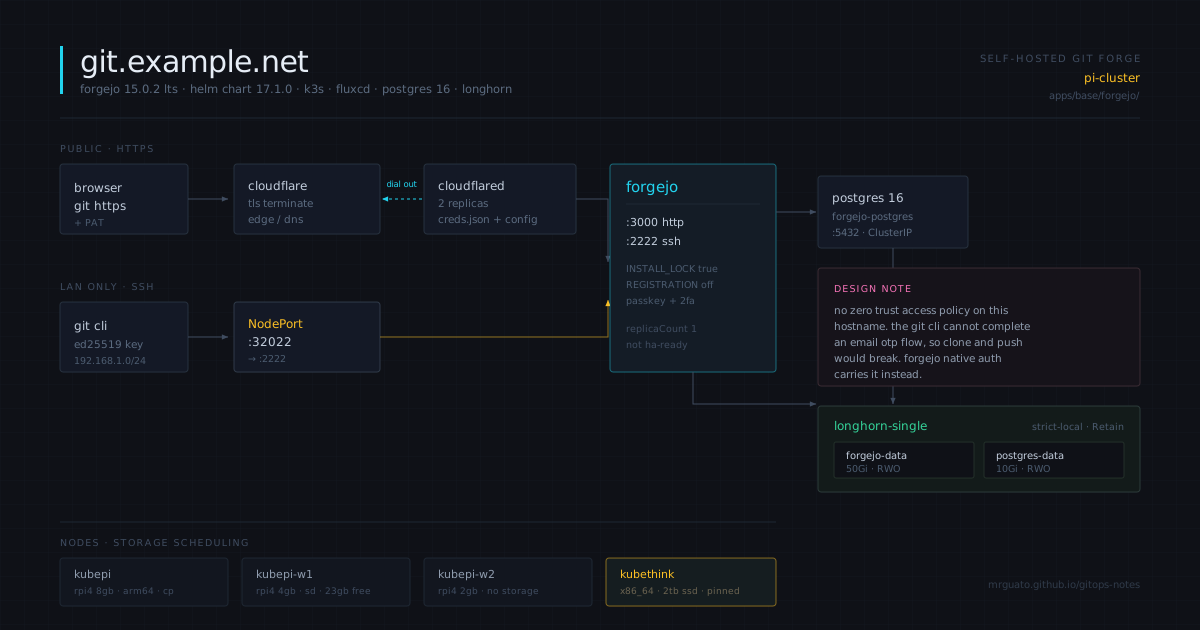
The short version is that I now run my own git server. It lives on a four node k3s cluster in my house, three Raspberry Pis and one Lenovo ThinkStation, and it is reachable at git.example.com through a Cloudflare Tunnel. Every manifest that describes it is committed to a repo. If it is not in Git, it does not exist, and that rule applies to the thing hosting Git too.
The longer version is below, including the parts where I got it wrong.
Why bother
There are two reasons and they are not the same reason, which took me a while to untangle.
The first one is ownership. I have code on GitHub going back years. Some of it is genuinely mine and some of it is forks and clones of projects I care about. I do not love where Microsoft has taken the platform, but honestly that is the weaker reason of the two. The stronger one is that GitHub is a single point of failure for things I did not write and cannot replace. AzerothCore, CMaNGOS, a handful of other emulator and tooling projects. Those live at the pleasure of whoever holds the copyright and whoever is willing to keep maintaining them. If one of them gets a takedown notice on a Tuesday, my local clone from eight months ago is what I have.
That is not a hypothetical I made up to justify a homelab project. It happens.
The second reason is that a git forge is a genuinely good thing to run if you want to understand production infrastructure. It is stateful. It needs a database. It has an SSH surface and an HTTP surface with different auth models. It has to survive restarts without losing data. Compare that to another stateless web app where you can delete the pod and shrug. Forgejo makes you actually think about storage, backups, and what happens when the node it lives on goes away.
So: archival, and skills. Two problems, and I do this everyday at work, and now I am replicating it at home lol.
The stack
Forgejo v15.0.2, which is the current LTS, deployed via the official Helm chart at version 17.1.0. Postgres 16 as the backend. Longhorn for storage. FluxCD reconciles all of it from Git. SOPS with age for anything secret.
Cloudflare Tunnel handles HTTPS. SSH is a NodePort on 32022, LAN only.
That SSH decision is worth explaining. My other self hosted apps sit behind Cloudflare Zero Trust with OTP in front of them, which is great for a web UI where every legitimate visitor is me. It does not work for git. The git CLI cannot click through an OTP page. Point git clone at a hostname with an Access policy on it and you get an HTML login form where git expected a packfile, and the error message is not helpful about why.
There are ways around this. You can use Cloudflare Access service tokens and inject headers into your git config. You can bypass Access on the API paths. Both add friction on every machine I ever want to clone from, and the second one is easy to misconfigure into either a lockout or an accidental hole.
So I did what basically every public Forgejo and Gitea instance on the internet does: no Access policy, and lean on Forgejo’s own auth instead. Registration disabled, install wizard locked, passkey on the admin account. Cloudflare does TLS and edge protection and nothing else.
I went back and forth on this one. It is the piece I am least settled about.
Things that bit me
The chart version is not the app version
Forgejo’s Helm chart does not follow Forgejo’s versioning at all. Chart 17.0.0 ships app version 15.0.0. Chart 17.0.1 ships 15.0.1. Chart 17.1.0 ships 15.0.2, which is what I wanted.
I have been burned before by pinning an image tag inside a HelmRelease and ending up with a chart and a binary that disagree with each other, so this time I checked first:
for v in 17.0.1 17.0.2 17.0.3 17.1.0; do
  printf '%s -> ' "$v"
  helm show chart oci://code.forgejo.org/forgejo-helm/forgejo --version $v 2>/dev/null | grep '^appVersion'
done
Five seconds of work that saved me from silently running an older LTS patch than I thought I was.
Chart 17 dropped the bundled databases
Older docs and every blog post I found describe enabling a Postgres subchart in values. That block does not exist in chart 17. They pulled the Bitnami dependencies out entirely.
I only found this because I grepped the values file instead of assuming:
grep -c -E '^(postgresql|postgresql-ha|valkey|redis):' /tmp/forgejo-chart-values.yaml
# 0
This turned out to be good news. Bitnami restructured their public Docker Hub catalog last year and broke a lot of charts that depended on docker.io/bitnami/*. Writing my own Postgres Deployment, Service, and PVC is more YAML, but it is my YAML. I pick the image, I pick the version, I pick the resource limits. Nothing surprises me on a dependency bump I did not choose.
I nearly shipped an empty SECRET_KEY
This is the one that actually scared me.
SECRET_KEY is what Forgejo uses to encrypt TOTP secrets, OAuth tokens, and LFS JWTs at rest in the database. I generated all my values into a scratch file, then ran a check on it before building the secret:
FORGEJO_ADMIN_USER: 7 chars
FORGEJO_ADMIN_PASSWORD: 44 chars
POSTGRES_PASSWORD: 48 chars
FORGEJO_SECRET_KEY: 0 chars
FORGEJO_INTERNAL_TOKEN: 0 chars
Two zeros. The command that was supposed to generate them had failed earlier on a mangled paste in a browser shell, and I had not noticed because the failure scrolled past.
If that had gone through, Forgejo would have come up completely healthy. Login works. Repos work. Pushes work. And then months later I enable 2FA and the TOTP secret gets encrypted with an empty key, and I find out the hard way.
Check your generated values before you use them or end up almost like me.
local-path is still the default storage class
My cluster has Longhorn, but local-path is still marked default:
local-path (default)   rancher.io/local-path
longhorn               driver.longhorn.io
Every PVC that does not name a storage class explicitly gets local-path, which welds the volume to whatever node provisioned it. I already learned this one the hard way with an earlier app. Every PVC in this deployment names its class explicitly. No relying on defaults, ever.
The storage decision
This one required actually thinking rather than copying a pattern.
My default Longhorn class is two replicas. Storage scheduling is enabled on two nodes: the ThinkStation with a 2TB external SSD, and one Raspberry Pi 4 running off an SD card.
Forgejo wants 50Gi. Postgres wants 10Gi. The Pi had 23GB free. It does not fit.
My first instinct was that this was about memory, because the Pis are small. It is not. Longhorn replicas cost disk on the node holding them, not RAM. The actual problem is write latency: Longhorn writes synchronously to every replica before it acknowledges. Put a replica on an SD card and every git push, every git gc, every Postgres commit is gated on that SD card finishing its write. I would have a forge running on NVMe that performs like an SD card, and I would be putting sustained random writes on flash storage that hates exactly that.
So: one replica, pinned to the ThinkStation, with a dedicated storage class rather than changing the global default.
apiVersion: storage.k8s.io/v1
kind: StorageClass
metadata:
  name: longhorn-single
provisioner: driver.longhorn.io
allowVolumeExpansion: true
reclaimPolicy: Retain
volumeBindingMode: Immediate
parameters:
  numberOfReplicas: "1"
  staleReplicaTimeout: "30"
  fsType: "ext4"
  dataLocality: "strict-local"
reclaimPolicy: Retain because with one replica and no backup target yet, a deleted PVC would be gone for good. dataLocality: strict-local keeps the replica on the same node as the pod so reads and writes never cross the network.
Why I’m mirroring instead of migrating
Two problems, two solutions, and I keep them separate on purpose.
For other people’s projects, Forgejo has pull mirrors built in. Point it at a URL, set an interval, done. It fetches all branches, all tags, full history, on a schedule. Public repos do not even need credentials. I am putting these in a dedicated org so a year from now it is obvious which repos are mine and which are archives.
For my own repos, I am not doing a big bang migration and I would recommend nobody else does either. GitHub’s free CI on public repos is genuinely hard to beat when your alternative is three Raspberry Pis and one ThinkStation. Forgejo Actions is a solid reimplementation of GitHub Actions, but I have to supply the compute, and for anything build-heavy that is a real downgrade.
So the plan is gradual. New projects start on Forgejo. Existing repos move when I next touch them anyway. Eventually Forgejo becomes primary and GitHub becomes a push mirror for visibility and free runners, which is the arrangement I actually want philosophically.
One repo is staying on GitHub for now, and it is the interesting exception: pi-cluster itself. Flux pulls from it. If I move it to Forgejo, my GitOps source lives on the cluster it manages, which means if Forgejo goes down Flux cannot reconcile the fix for whatever broke Forgejo. That circular dependency is not fatal but it is not something to walk into casually, so I am leaving it alone until I have thought about it properly.
What’s next
Roughly in the order I care about:
Postgres backups off cluster. Single replica storage means the database has no redundancy and it holds the only copy of issues, PRs, users, and tokens.
Finish Falco, properly, on a branch, and not on main where it can take down unrelated deployments.
Forgejo Actions runners. v15 added a web UI registration flow which removes the annoying CLI step inside containers. This is its own project though, so more to come on these.
Age key rotation and disk encryption on the physical nodes. Both have been on the list a while and both keep losing to more interesting work, which is exactly how security debt accumulates.
The whole thing took an evening, and maybe a third of that was Forgejo. The rest was a Longhorn upgrade I did not ask for, a Falco typo blocking an unrelated deployment, and a storage decision I initially got the reasoning wrong on.
That ratio feels about right for infrastructure work. The thing you set out to build is rarely the thing that takes the time.
Manifests are in pi-cluster under apps/base/forgejo/ and apps/staging/forgejo/.
Built with ❤️ by Jonathan - If it is not in Git, it does not exist.