Securing Grafana with TLS in a FluxCD GitOps Homelab

The Goal
My k3s homelab runs kube-prometheus-stack, which deploys Grafana as part of the monitoring stack. I route traffic through a Cloudflare Tunnel, but the ingress controller (Traefik, bundled with k3s) still needs a TLS secret to do in-cluster HTTPS termination. The catch: all my secrets live in Git, SOPS-encrypted with age. I can’t just kubectl apply a plaintext secret — that defeats the point of GitOps.
Here’s exactly what I did.
The Pattern
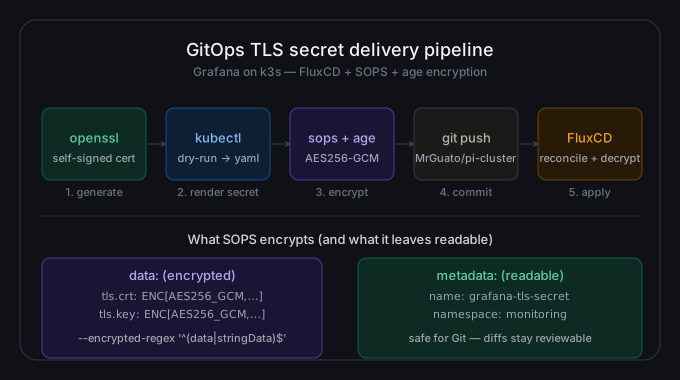
The full workflow looks like this:
- Generate a self-signed TLS certificate with
openssl - Use
kubectl --dry-run=clientto render aSecretmanifest without touching the cluster - Encrypt the manifest in place with SOPS + age (only the
datafields get encrypted) - Move the encrypted file into the right GitOps path, wire up the kustomizations, and push
- FluxCD reconciles, the SOPS controller decrypts, and the Secret appears in the cluster
At no point does a plaintext private key touch Git.
Step 1: Generate the Certificate
openssl req -x509 -nodes -days 365 -newkey rsa:2048 \
  -keyout ./tls.key \
  -out ./tls.crt \
  -subj "/C=US/ST=Boston/L=Basement/O=Home Lab Heroes Inc./OU=Department of Monitoring/CN=grafana.yourdomain.net" \
  -addext "subjectAltName=DNS:grafana.yourdomain.net"
The -nodes flag skips the passphrase (required for automated ingress use). The -addext "subjectAltName=..." line is important — modern browsers and ingress controllers validate the SAN, not just the CN.
Note: This is a self-signed cert. It will trigger browser warnings if accessed directly. In my case, Cloudflare terminates the public-facing TLS, so this cert only exists inside the cluster between Traefik and the backend. For a direct-exposure setup, use cert-manager + Let’s Encrypt instead.
Step 2: Render the Secret Manifest Without Applying It
kubectl create secret tls grafana-tls-secret \
  --cert=tls.crt \
  --key=tls.key \
  --namespace=monitoring \
  --dry-run=client \
  -o yaml > grafana-tls-secret.yaml
--dry-run=client renders the YAML locally — no cluster connection needed. The output is a standard kubernetes.io/tls Secret with base64-encoded tls.crt and tls.key under the data key.
Step 3: SOPS-Encrypt the Manifest
export AGE_PUBLIC=age1esq3qzaqeuwrfzu8fx89u9k8dl3uvmse460l29kt28yj8vefn9wstkgdn7

sops --age=$AGE_PUBLIC \
  --encrypt --encrypted-regex '^(data|stringData)$' \
  --in-place grafana-tls-secret.yaml
Two things worth calling out here:
--encrypted-regex '^(data|stringData)$' — This tells SOPS to only encrypt the actual secret values. The kind, metadata, name, namespace, and type fields stay in plaintext. This makes Git diffs readable and keeps the SOPS MAC (message authentication code) covering only what matters.
--in-place — Overwrites the file with its encrypted version. After this, tls.crt and tls.key inside the YAML are AES256-GCM ciphertext. The age recipient public key is embedded in the sops: block at the bottom.
The raw tls.key and tls.crt files from Step 1 should be deleted and gitignored immediately. They served their purpose.
Step 4: Place Files in the GitOps Tree
My repo uses a base/overlay Kustomize pattern, with Flux auto-discovering subfolders that contain a kustomization.yaml. For monitoring, I maintain a monitoring/configs/ tree separate from monitoring/controllers/ — configs holds environment-specific secrets and patches, controllers holds HelmReleases and HelmRepositories.
I created this structure:
monitoring/
└── configs/
    └── staging/
        ├── kustomization.yaml
        └── kube-prometheus-stack/
            ├── kustomization.yaml
            └── grafana-tls-secret.yaml   ← the SOPS-encrypted file
The kustomization.yaml at configs/staging/kube-prometheus-stack/ is straightforward:
apiVersion: kustomize.config.k8s.io/v1beta1
kind: Kustomization
resources:
  - grafana-tls-secret.yaml
And the one at configs/staging/ lists the subdirectory:
apiVersion: kustomize.config.k8s.io/v1beta1
kind: Kustomization
resources:
  - kube-prometheus-stack
Flux picks this up because clusters/staging/monitoring.yaml points at the monitoring/ directory.
Step 5: Update the HelmRelease Values
In monitoring/controllers/base/kube-prometheus-stack/release.yaml, I added the ingress + TLS configuration to the Grafana values block:
values:
  grafana:
    ingress:
      enabled: true
      ingressClassName: traefik
      hosts:
        - grafana.yourdomain.net
      tls:
        - secretName: grafana-tls-secret
          hosts:
            - grafana.yourdomain.net
The secretName here must match the metadata.name in grafana-tls-secret.yaml exactly — a mismatch causes a silent TLS failure where the ingress comes up but serves no certificate.
Step 6: Commit and Push
git add clusters/ apps/ monitoring/
git commit -m "feat: add grafana TLS secret"
git push
Flux reconciles on its interval (or immediately with flux reconcile), the SOPS controller decrypts the secret using the age key stored as a cluster secret, and the grafana-tls-secret Secret appears in the monitoring namespace. Traefik picks it up, and Grafana is now accessible at https://grafana.yourdomain.net with in-cluster TLS.
What Actually Broke (And How I Fixed It)
This wasn’t a clean one-shot deployment. Two bugs hit in sequence.
Bug 1: YAML indentation broke the entire kustomize build
After the first push, flux get kustomizations showed monitoring as READY: False with this error:
MalformedYAMLError: yaml: line 40: mapping values are not allowed in this context in File: release.yamlThe culprit was a subtle indentation mistake in the tls block of release.yaml. The hosts key was indented one level too far, making it a child of secretName instead of a sibling:
# What I wrote (wrong)
tls:
  - secretName: grafana-tls-secret
      hosts:
        - grafana.yourdomain.net

# What it should be
tls:
  - secretName: grafana-tls-secret
    hosts:
      - grafana.yourdomain.net
YAML list item fields (secretName and hosts are both keys on the same list element) must be at the same indentation level. The extra indent made YAML see hosts as a nested mapping inside secretName’s value, which is invalid.
Fixed, committed, pushed. The monitoring kustomization went green.
Bug 2: The configs path wasn’t registered with Flux
With the YAML fixed, Flux reconciled monitoring successfully — but kubectl get secrets -n monitoring still showed no grafana-tls-secret. Running flux get kustomizations showed only three entries: apps, flux-system, and monitoring. The monitoring-configs kustomization I expected didn’t exist.
The reason: clusters/staging/monitoring.yaml only pointed Flux at ./monitoring/controllers/staging. The ./monitoring/configs/staging path — where the encrypted secret lives — was never registered. Flux doesn’t auto-discover all subdirectories; you have to explicitly tell it where to look.
The fix was adding a second Kustomization block to monitoring.yaml:
---
apiVersion: kustomize.toolkit.fluxcd.io/v1
kind: Kustomization
metadata:
  name: monitoring-configs
  namespace: flux-system
spec:
  interval: 1m0s
  retryInterval: 1m
  timeout: 5m
  sourceRef:
    kind: GitRepository
    name: flux-system
  path: ./monitoring/configs/staging
  prune: true
  decryption:
    provider: sops
    secretRef:
      name: sops-age
After pushing and reconciling the source, flux get kustomizations showed four entries including monitoring-configs: READY True. A few seconds later, kubectl get secrets -n monitoring showed grafana-tls-secret with TYPE: kubernetes.io/tls and DATA: 2. Done.
Confirming It Worked
kubectl get ingress -n monitoring
# NAME                            CLASS     HOSTS                    ADDRESS        PORTS
# kube-prometheus-stack-grafana   traefik   grafana.yourdomain.net   192.168.1.21   80, 443

flux reconcile helmrelease kube-prometheus-stack -n monitoring
# ✔ applied revision 82.14.0
The ingress shows PORTS: 80, 443 — TLS is configured. The Helm release reconciled cleanly against the updated values.
GitOps + secrets = SOPS, always. You cannot push a plaintext Kubernetes Secret to a Git repo and call it GitOps. The SOPS + age workflow gives you an encrypted file that Flux knows how to decrypt at apply time — the best of both worlds.
Only encrypt what matters. The --encrypted-regex flag is a deliberate choice. Keeping metadata in plaintext makes code review possible. The encrypted fields are protected by AES256-GCM; the unencrypted fields are just labels.
Secret name consistency is a hidden gotcha. The name in the SOPS manifest, the name referenced in your HelmRelease values, and the namespace must all align. Check these first if TLS isn’t working after reconciliation.
kubectl can’t decrypt SOPS secrets. Don’t try kubectl apply -f grafana-tls-secret.yaml directly. Only Flux + the SOPS controller can handle decryption. Keep your imperative kubectl habits away from encrypted manifests.
Repo
All manifests for this setup live in github.com/MrGuato/pi-cluster.
Built with ❤️ by Jonathan — If it is not in Git, it does not exist.