Adding a ThinkStation to a Raspberry Pi Kubernetes Cluster

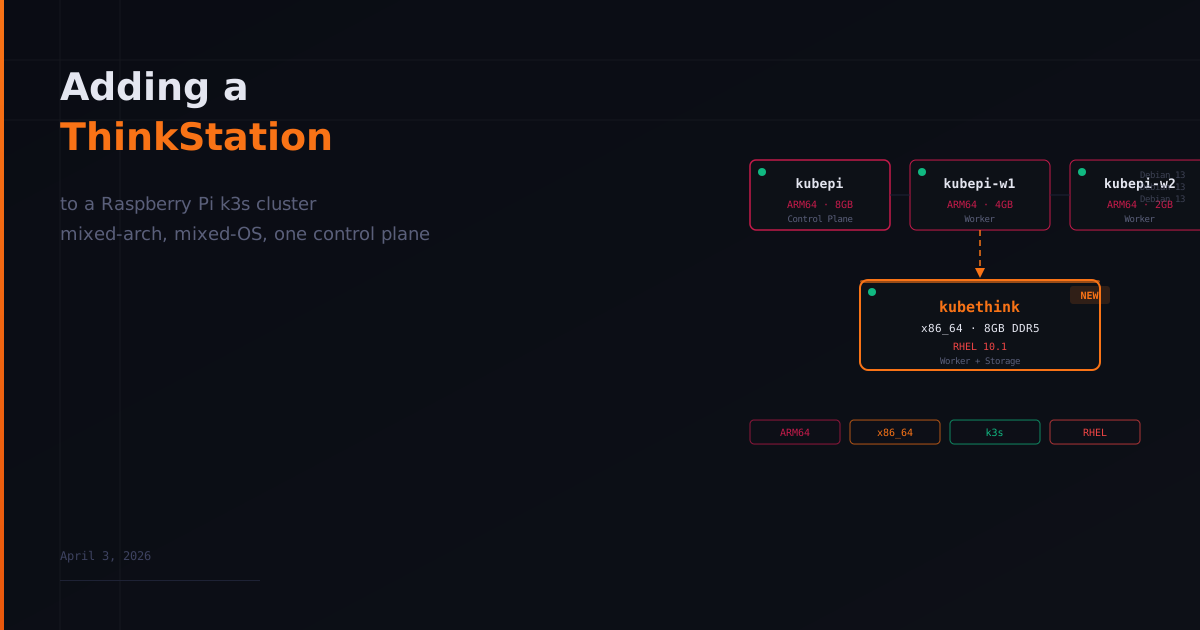
The cluster started as three Raspberry Pi 4 nodes running Debian. An 8GB as the control plane, a 4GB and a 2GB as workers. It worked. But every stateful workload was pinned to kubepi because local-path PVCs are physically bound to the node where they were created. If I wanted distributed storage, I needed more capacity than SD cards could offer. And I had a Lenovo ThinkStation sitting unused.
This post covers the full process of joining a ThinkStation running Red Hat Enterprise Linux to an existing k3s Pi cluster. The result is a mixed-architecture (ARM64 + x86_64), mixed-OS (Debian + RHEL) cluster that mirrors how enterprise Kubernetes environments actually look.
Why RHEL
I could have installed Ubuntu Server and been done in 20 minutes. But the goal of this homelab is not convenience. It is learning things that transfer to real jobs.
Most enterprise Kubernetes runs on RHEL or its ecosystem. The package manager is different (dnf vs apt). SELinux exists and has opinions. Firewalld needs to be dealt with. The subscription model is its own thing. These are all skills that matter professionally.
Red Hat offers a Developer Subscription for Individuals at no cost. It includes the full RHEL binaries, identical to paid subscriptions, for up to 16 systems. It is a 12-month subscription that renews annually through developers.redhat.com. There is no reason not to use the real thing.
Building the RHEL Image
I used the RHEL Image Builder through the Red Hat customer portal. This is a web-based tool that lets you customize a RHEL image before downloading it.
The important configuration choices during the build:
Additional packages: iscsi-initiator-utils (required for Longhorn), nfs-utils, and curl (required for the k3s install script).
Disabled services: firewalld. k3s networking conflicts with firewalld and the debugging is not worth it on a homelab network. Enterprise clusters handle network policy at the Kubernetes level with Calico or Cilium, not at the host firewall.
Enabled services: sshd and iscsid.
User configuration: Created a user with admin (sudo) privileges and added my SSH public key from kubepi so I could SSH in without a password.
Hostname: kubethink. The name immediately tells you what hardware you are on. The cluster has kubepi, kubepi-w1, kubepi-w2, and kubethink.
Preparing RHEL for k3s
RHEL needs explicit configuration that Debian handles out of the box. After the OS was installed and booted, I ran through these steps.
Disable firewalld:
sudo systemctl disable --now firewalldSet SELinux to permissive:
sudo setenforce 0
sudo sed -i 's/^SELINUX=enforcing/SELINUX=permissive/' /etc/selinux/config
Load kernel modules that k3s requires:
echo "br_netfilter" | sudo tee /etc/modules-load.d/k3s.conf
echo "overlay" | sudo tee -a /etc/modules-load.d/k3s.conf
sudo modprobe br_netfilter
sudo modprobe overlay
Set sysctl parameters for Kubernetes networking:
echo "net.bridge.bridge-nf-call-iptables = 1" | sudo tee /etc/sysctl.d/k3s.conf
echo "net.bridge.bridge-nf-call-ip6tables = 1" | sudo tee -a /etc/sysctl.d/k3s.conf
echo "net.ipv4.ip_forward = 1" | sudo tee -a /etc/sysctl.d/k3s.conf
sudo sysctl --system
Enable the iSCSI daemon for Longhorn:
sudo systemctl enable --now iscsidNone of this is optional on RHEL. Skip any of it and k3s will either fail to start or behave unpredictably.
Mounting the Samsung T7 Shield
The ThinkStation has a 238GB NVMe drive for the OS and a 2TB Samsung T7 Shield connected via USB for Longhorn storage. The separation is intentional. OS and data live on different disks, exactly how enterprise storage nodes work.
The T7 came pre-formatted as exFAT. I wiped it and formatted as ext4:
sudo wipefs -a /dev/sdb1
sudo mkfs.ext4 /dev/sdb1
Mounted it:
sudo mkdir -p /mnt/longhorn-storage
sudo mount /dev/sdb1 /mnt/longhorn-storage
Made it persistent across reboots using UUID, not device name. Device names can shift if you plug in another USB device. UUIDs never change:
sudo blkid /dev/sdb1
echo 'UUID=<uuid> /mnt/longhorn-storage ext4 defaults 0 2' | sudo tee -a /etc/fstab
The T7 Shield originally was going to connect to a Raspberry Pi, but the Pi 4 USB bus could not deliver enough power. The drive would blink blue for five seconds and then shut off. The ThinkStation has no such limitation. This is one of those problems you only discover by trying.
Joining the Cluster
On kubepi, I grabbed the join token:
sudo cat /var/lib/rancher/k3s/server/node-tokenOn kubethink, I ran the k3s agent install:
curl -sfL https://get.k3s.io | K3S_URL=https://192.168.x.x:6443 K3S_TOKEN=<token> sh -Twelve seconds later:
kubethink Ready <none> 12s v1.34.6+k3s1The node showed amd64 in the architecture column while every other node showed arm64. Mixed-architecture cluster, running.
I labeled it immediately:
kubectl label node kubethink node-role.kubernetes.io/worker=true
kubectl label node kubethink node.longhorn.io/storage=true
The Version Skew Problem
Before adding kubethink, kubepi was running k3s v1.32.10 while the workers were on v1.34.5. That is a two-minor-version gap between the control plane and workers. Kubernetes supports workers being behind the control plane, but workers ahead of the control plane is technically unsupported.
The correct upgrade path is sequential: v1.32 to v1.33 to v1.34, verifying cluster health at each step. There is also a critical etcd consideration. k3s v1.34 includes etcd 3.6, and there is no safe path from etcd 3.5 to 3.6 without upgrading to etcd v3.5.26 first (included in later k3s v1.32 patches).
I skipped straight to v1.34.6. It worked because kubepi is a single control plane node with consistent etcd membership. The etcd upgrade warning specifically targets clusters where nodes are added and removed across versions. But this is not something I would recommend as standard practice. Sequential upgrades exist for a reason.
Mixed-Architecture Gotcha
The first thing that broke after kubethink joined was the status dashboard. The container image was built on kubepi (ARM64), and Kubernetes scheduled the new pod on kubethink (x86_64). The result was ImagePullBackOff with “no match for platform in manifest.”
The fix is a nodeSelector in the deployment:
nodeSelector:
  kubernetes.io/arch: arm64
This pins the dashboard to ARM nodes. The proper fix is building multi-arch images, but for a single-platform image, nodeSelector is the pragmatic solution.
This is a real-world lesson. Mixed-architecture clusters require architecture-aware scheduling. Every deployment needs to account for where it can actually run. Enterprise clusters deal with this constantly.
The Result
The cluster now has four nodes across two CPU architectures and two operating systems. kubectl shows Debian and RHEL side by side, ARM64 and x86_64 on the same control plane. The ThinkStation brings 8GB of DDR5 RAM and 2TB of fast SSD storage that the Pis could never provide.
kubepi      Ready    control-plane,master   123d   Debian GNU/Linux 13    arm64
kubepi-w1   Ready    worker                 4d     Debian GNU/Linux 13    arm64
kubepi-w2   Ready    worker                 4d     Debian GNU/Linux 13    arm64
kubethink   Ready    worker                 6m     RHEL 10.1 (Coughlan)   amd64
This is not how most homelab tutorials end. Most of them stop at three identical Pis running the same OS. A mixed-architecture, mixed-OS cluster is closer to what you would actually encounter in production. And the debugging that comes with it is where the real learning happens.
Full configuration is in the pi-cluster repository.
Built with ❤️ by Jonathan - If it is not in Git, it does not exist.