Distributed Storage on a Homelab with Longhorn

Until today, every stateful workload in my cluster was stuck on one node.
The local-path provisioner that ships with k3s creates PVCs that are physically bound to the node where they are first scheduled. If Linkding’s PVC lives on kubepi, Linkding runs on kubepi. If kubepi goes down, the data is gone. There is no replication, no failover, no mobility.
Longhorn changes that. It is a CNCF-incubating distributed block storage system built specifically for Kubernetes. It replicates volumes across nodes, handles failover automatically, and integrates with the Kubernetes CSI interface so pods consume storage the same way they always have. The only difference is the data now exists in more than one place.
Why Longhorn Over NFS
I have a NAS on the network. Mounting NFS shares would have been the fastest path to shared storage. But NFS is a solved problem. Nobody puts “configured NFS mounts” on a resume.
Longhorn teaches Kubernetes-native storage concepts that transfer directly to enterprise tools: dynamic provisioning, StorageClasses, volume replication, snapshot and restore, node scheduling for replicas. These are the same concepts behind Portworx, Rook-Ceph, and every cloud CSI driver. Understanding Longhorn means understanding the category.
Storage Topology
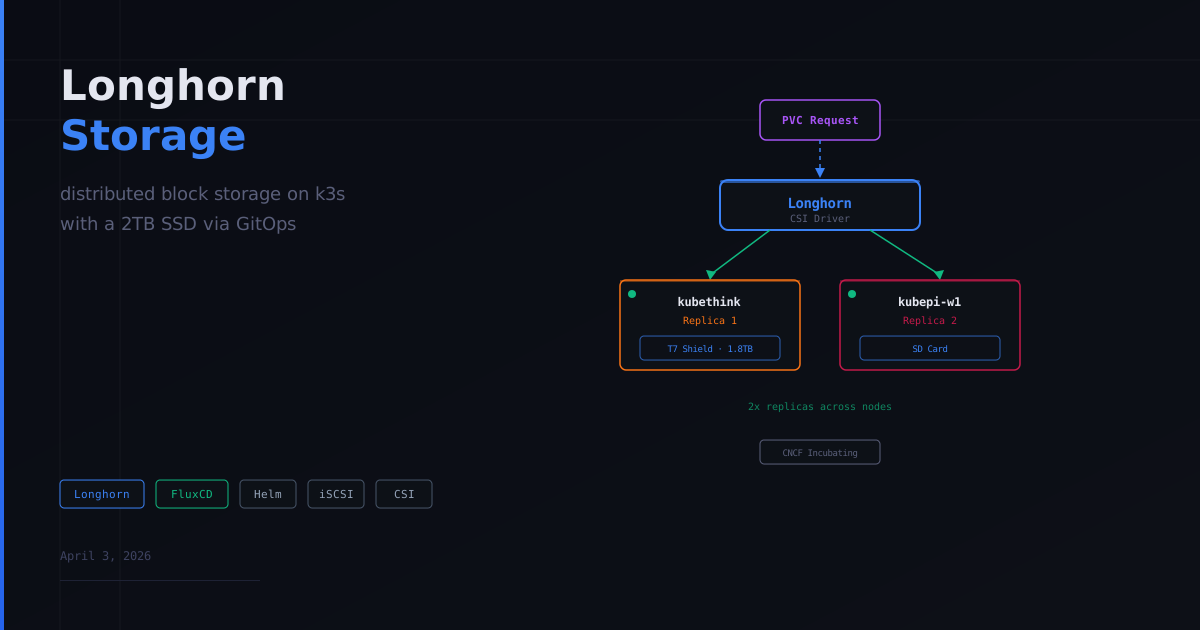
The cluster has four nodes, but only two participate in Longhorn storage:
kubethink is the primary storage node. It is a Lenovo ThinkStation running RHEL with a 2TB Samsung T7 Shield mounted at /mnt/longhorn-storage/. This is where the bulk of replica data lives.
kubepi-w1 is the secondary storage node. It is a 4GB Raspberry Pi with Longhorn using its SD card at /var/lib/longhorn/. It holds the second replica for redundancy.
kubepi (control plane, 8GB) and kubepi-w2 (2GB worker) are excluded from storage scheduling. kubepi already handles the control plane workload. kubepi-w2 has only 2GB of RAM, and Longhorn’s manager, replica engines, and CSI driver would consume most of it before any workloads even start.
With a default replica count of 2, every Longhorn volume has one copy on the T7 Shield and one copy on kubepi-w1. If either node goes down, the data survives on the other.
GitOps Deployment
Longhorn is deployed via a Flux HelmRelease in infrastructure/controllers/base/longhorn/. The manifests follow the same base/staging overlay pattern as everything else in the cluster.
The structure:
infrastructure/controllers/base/longhorn/
  namespace.yaml
  helmrepository.yaml
  helmrelease.yaml
  kustomization.yaml

infrastructure/controllers/staging/longhorn/
  kustomization.yaml
The namespace requires a pod-security.kubernetes.io/enforce: privileged label because Longhorn manages raw disks on the host. Without it, pod security admission blocks the daemonsets.
Key Helm values:
createDefaultDiskLabeledNodes: truemeans Longhorn only creates disks on nodes I explicitly label. No surprise storage consumption on the 2GB Pi.defaultReplicaCount: 2matches the two storage nodes.defaultClass: falsekeeps local-path as the default StorageClass. Existing workloads are completely unaffected. Pods opt in to Longhorn by specifyingstorageClassName: longhorn.serviceMonitor.enabled: truepushes Longhorn metrics into the existing kube-prometheus-stack.
Configuring the Storage Nodes
After Longhorn deployed, I labeled the storage nodes:
kubectl label node kubepi-w1 node.longhorn.io/create-default-disk=true
kubectl label node kubethink node.longhorn.io/create-default-disk=true
For kubethink, I also needed to tell Longhorn to use the T7 at /mnt/longhorn-storage/ instead of the default /var/lib/longhorn/. This requires an annotation:
kubectl annotate node kubethink node.longhorn.io/default-disks-config='[{"path":"/mnt/longhorn-storage/","allowScheduling":true,"name":"t7-shield"}]'The order matters. I applied the label before the annotation, so Longhorn created a default disk at /var/lib/longhorn/ before it saw my custom path. Fixing this required disabling the old disk, adding the new one, and deleting the old one in three separate patches because Longhorn protects against deleting active disks.
The correct sequence: annotate first, then label.
Non-storage nodes were explicitly excluded:
kubectl patch nodes.longhorn.io kubepi -n longhorn-system --type merge -p '{"spec":{"allowScheduling":false}}'
kubectl patch nodes.longhorn.io kubepi-w2 -n longhorn-system --type merge -p '{"spec":{"allowScheduling":false}}'
What Broke
Three things broke during the Longhorn deployment.
open-iscsi was missing on the Pi nodes. Longhorn’s manager daemonset runs on every node, and it requires iscsiadm to be present on the host. I had installed iscsi-initiator-utils on kubethink during the RHEL image build, but the three Pi nodes running Debian did not have open-iscsi installed. Three of the four manager pods immediately crash-looped with:
Error starting manager: failed to check environment, please make sure
you have iscsiadm/open-iscsi installed on the host
The fix was straightforward:
sudo apt install -y open-iscsi
sudo systemctl enable --now iscsid
Repeated on all three Pi nodes. The manager pods recovered on their own once the dependency was present.
A pre-existing Velero YAML error blocked the entire deployment. Longhorn and Velero share the same Flux kustomization (infrastructure-controllers). A malformed line in Velero’s helmrelease caused Kustomize to fail, which blocked every resource in that kustomization from deploying. I pushed the Longhorn manifests, watched Flux, and saw infrastructure-controllers stuck at False with a YAML error in Velero’s file. Longhorn was correct but could not deploy because of a sibling’s syntax error.
The disk annotation ordering issue. Covered above. Label before annotate creates a default disk you then have to clean up manually.
Testing It
A quick PVC test confirmed everything worked:
apiVersion: v1
kind: PersistentVolumeClaim
metadata:
  name: longhorn-test
  namespace: default
spec:
  accessModes:
    - ReadWriteOnce
  storageClassName: longhorn
  resources:
    requests:
      storage: 1Gi
longhorn-test Bound pvc-68c2c909... 1Gi RWO longhorn 6sBound in six seconds. Longhorn provisioned the volume, placed replicas on kubethink and kubepi-w1, and the PVC was ready for a pod to consume. Cleaned it up after verification.
What This Enables
With Longhorn running, workloads are no longer pinned to specific nodes. A deployment requesting storageClassName: longhorn can schedule on any node in the cluster. If the node goes down, the pod reschedules elsewhere and reattaches to the same volume because the data exists on multiple nodes.
This also opens the door to volume snapshots, backup targets (Longhorn can ship backups to S3-compatible storage), and monitoring storage health through the Prometheus metrics that are already flowing into Grafana.
The storage story went from “everything dies if the SD card in kubepi fails” to “data is replicated across a 2TB SSD and a secondary node with automatic failover.” That is a meaningful improvement in cluster resilience and a real-world skill that translates directly to enterprise storage management.
Full configuration is in the pi-cluster repository.
Built with ❤️ by Jonathan - If it is not in Git, it does not exist.