Headlamp on k3s: a read-only Kubernetes UI behind a Cloudflare Tunnel

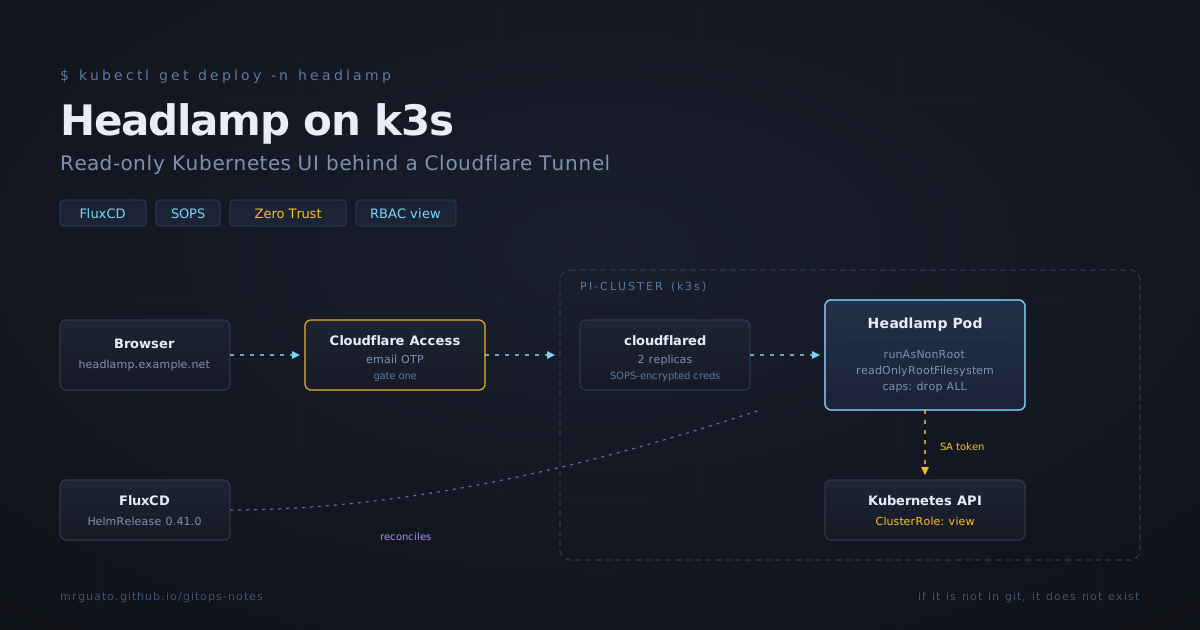
I run a four-node k3s cluster at home, three Raspberry Pi 4s and a Lenovo ThinkStation. Everything is managed through FluxCD, all secrets are encrypted with SOPS, and every app is exposed only through Cloudflare Tunnels gated by Zero Trust email OTP. No open ports.
For the last several months I’ve been doing all my cluster inspection through kubectl and Grafana dashboards. That works fine for me, but I’ve been wanting a proper UI for two reasons:
- When something is broken, jumping between terminals to query different resource types is slower than scanning a dashboard.
- I want the option to demo the cluster to people without making them learn
kubectl.
The default Kubernetes Dashboard has a checkered security history and feels dated. After looking around, I picked Headlamp, it’s now part of Kubernetes SIG UI, it’s actively maintained, the chart is clean, and it plays well with a least-privilege RBAC posture.
This post walks through what I deployed, why each piece is there, and the four mistakes I made along the way. The mistakes are the most useful part.
What I built
Five pieces, all under apps/base/headlamp/ in my GitOps repo:
- HelmRelease pinning chart
0.41.0, with the chart’s own Ingress disabled (I use Traefik IngressRoute instead) and the chart’s ClusterRoleBinding pointed at the built-inviewClusterRole. - Separate
headlamp-loginServiceAccount with a long-lived token Secret, also bound toview. This is the identity I authenticate as in the UI. Keeping it separate from the pod’s own ServiceAccount means I can rotate the login token without restarting Headlamp. - Cloudflared Deployment — two replicas, multi-arch image, reading
credentials.jsonandconfig.yamlfrom a SOPS-encrypted Secret. Same per-namespace pattern I use for Vikunja, Linkding, and Obsidian LiveSync. - Traefik IngressRoute — strictly speaking unnecessary today, but it gives me a clean attachment point for middleware later (rate limits, IP allow-lists).
- Namespace with Pod Security Admission set to
restricted.
The full architecture, end to end:
Browser → Cloudflare Access (email OTP) → cloudflared in cluster → Headlamp Service → Headlamp pod → Kubernetes API (using the SA token, restricted to
view)
Two authentication gates. Read-only at the API layer. Pod runs non-root with a read-only root filesystem and all Linux capabilities dropped. If somebody compromises the dashboard, the worst they can do is read the same things I can read — and they had to defeat email OTP to even reach it.
Why read-only
The standard objection: “but I want to delete pods from the UI sometimes.”
Sure, but I have kubectl for that. The dashboard’s job is to give me visibility. Making the dashboard a write surface means every login session is a potential blast radius. With view-only RBAC, the dashboard is mathematically incapable of mutating cluster state. Operations stay in kubectl (or, eventually, in PRs against the GitOps repo). Visibility goes through the UI.
The built-in view ClusterRole is exactly right for this — it grants read access to most resources but explicitly excludes Secrets and RBAC objects. Headlamp will show “Forbidden” when you navigate to the Secrets view. That’s not a bug, that’s the feature.
Why FluxCD HelmRelease, not raw manifests
Two reasons. First, the Headlamp chart is well-maintained and ships with sensible defaults — there’s no value in re-implementing it as raw Kustomize. Second, my Renovate Bot watches HelmRepository sources and opens PRs whenever a new chart version is published. That gives me an automated, reviewable upgrade path: PR comes in, I read the chart’s changelog, I merge if happy, Flux rolls it out.
The HelmRelease is pinned to a specific chart version. Immutable. No drift. Renovate is the only thing that bumps it.
The four ways I broke it before it worked
This is the part worth reading.
1. I pinned image.tag and broke the chart
My instinct was “always pin image tags, that’s good GitOps hygiene.” So I set:
image:
  repository: headlamp-k8s/headlamp
  tag: v0.38.0
The pod immediately crashlooped:
flag provided but not defined: -in-cluster-context-nameChart 0.41.0 passes a --in-cluster-context-name argument to the binary. That flag didn’t exist in Headlamp v0.38.0. The chart was rendering a Deployment that the binary couldn’t parse.
The fix: stop overriding image.tag. Chart authors ship a tested chart-and-binary pair. The chart’s appVersion is the version they tested against. Override it only when you have a specific reason. Renovate-bumping the chart version becomes the single source of truth.
Lesson: Don’t pin image.tag on community Helm charts unless you specifically need to. The chart’s appVersion is the right default.
2. readOnlyRootFilesystem: true broke /home/headlamp/.config
Hardening pass: I set readOnlyRootFilesystem: true and added an emptyDir at /tmp for scratch space. New crash:
mkdir /home/headlamp/.config: read-only file systemI’d assumed /tmp was the only path Headlamp wrote to. Wrong — it also writes to /home/headlamp/.config for plugin directory creation. Easy fix once you read the log carefully:
volumes:
  - name: home
    emptyDir: {}
  - name: tmp
    emptyDir: {}
volumeMounts:
  - name: home
    mountPath: /home/headlamp
  - name: tmp
    mountPath: /tmp
Lesson: When you turn on readOnlyRootFilesystem, the application will tell you exactly which path it wants to write to via the first crashloop log. Read it carefully before guessing.
3. I used extraVolumes instead of volumes
This one was the most embarrassing. I “fixed” the previous problem by writing:
extraVolumes:
  - name: home
    emptyDir: {}
extraVolumeMounts:
  - name: home
    mountPath: /home/headlamp
Many Helm charts use extraVolumes / extraVolumeMounts as the convention for adding pod volumes through values. The Headlamp chart predates that convention and uses plain volumes / volumeMounts at the values root. Unknown values keys get silently dropped — the rendered Deployment had no extra volumes at all, and the pod kept crashing on the same read-only FS error.
A ten-second sanity check would have caught this:
helm show values headlamp/headlamp --version 0.41.0 | grep -iE 'volume'Lesson: Always run helm show values against the exact chart version before authoring a HelmRelease. Don’t write values from memory or analogy.
4. Flux silently fought a stuck Helm release
After enough failed install attempts, the helm-controller’s client-side rate limiter kicked in. The HelmRelease entered a state where flux get hr reported Unknown — Running 'install' action with timeout of 10m0s and just sat there. No progress, no new ReplicaSet, no useful error. It looked like Flux was working — it wasn’t.
The unblock has three parts:
# 1. Suspend the HR so Flux stops fighting you
flux suspend hr headlamp -n headlamp

# 2. Manually clear the Helm release history
helm -n headlamp uninstall headlamp

# 3. Restart helm-controller to reset the rate limiter
kubectl -n flux-system rollout restart deployment helm-controller

# 4. Resume and force a fresh reconcile
flux resume hr headlamp -n headlamp
flux reconcile hr headlamp -n headlamp --force
The HR object itself doesn’t need to be deleted — Flux will recreate the Helm release from the existing HR spec on the next reconcile.
Lesson: When a HelmRelease appears stuck reconciling forever, suspect the rate limiter. The fix is helm uninstall plus kubectl rollout restart deployment helm-controller.
Bonus: my fix was on a feature branch
For about twenty minutes, none of my fixes were taking effect. I was chasing increasingly exotic theories about chart bugs. The real reason: I’d committed and pushed to feat/headlamp, but Flux only watches main. Two seconds of flux get sources git -A would have shown me the revision Flux was actually rendering against.
Lesson: When debugging “my changes aren’t taking effect,” the very first command should always be flux get sources git -A. Compare the revision Flux sees against git log --oneline origin/main -3.
The result
Once everything was right, the pod came up clean on the first try. The end-to-end flow now:
- Browser hits
headlamp.example.net - Cloudflare Access prompts for email OTP — magic link to my inbox
- After auth, Cloudflare proxies through the in-cluster cloudflared tunnel
- Headlamp serves its UI
- UI prompts for an “ID Token” (which is actually just a ServiceAccount bearer token — the prompt is misleading)
- I paste the token from
kubectl -n headlamp get secret headlamp-login-token -o jsonpath='{.data.token}' | base64 -d - I’m in, read-only, scoped to whatever the
viewClusterRole permits
All write attempts fail at the API layer. All access requires beating both Cloudflare’s auth and presenting a valid bearer token. The pod itself runs non-root, read-only FS, no capabilities. If it’s compromised, the blast radius is “the same things I’m allowed to read.”
That’s a posture I’m comfortable with for a homelab dashboard.
What I’d do differently next time
- Run
helm show valuesbefore writing a HelmRelease, every time. Not as a debugging step. - Don’t pin
image.tagoverrides on community charts unless I’m ready to manually track chart-binary version compatibility. - When debugging a stuck HelmRelease, check the source revision first, the rate limiter second, and the actual values third, in that order.
Headlamp is now part of my standard cluster toolkit. It sits next to Grafana as the “what’s happening right now” pane, and kubectl stays as the “make a change” tool. Clean separation of concerns, and one fewer reason to keep ten terminal tabs open.
The repo is at github.com/MrGuato/pi-cluster — the headlamp manifests are under apps/base/headlamp/ if you want to see what they look like in context.
Built with ❤️ by Jonathan - If it is not in Git, it does not exist.