PS01
SSH brute force
Five failed logins from one IP in five minutes. Twenty is critical.


Host security for Raspberry Pi
pisentry watches SSH, processes, files and listeners on Raspberry Pi and ARM Linux. It ranks the ten attacks that matter and tells you where to look first.
$ sudo pisentry report
pisentry Top 10  |  host kubepi  |  last 24h  |  2026-10-15 14:02 EDT

#   ID    CATEGORY                 EVENTS  WORST     LAST SEEN  ALL TIME  MITRE
1   PS06  Cryptominer              2       critical  35s ago    2         T1496
2   PS07  Unexpected listener      2       critical  38s ago    2         T1571
3   PS02  Suspicious login         1       critical  40s ago    1         T1078
4   PS08  Reverse shell            1       critical  39s ago    1         T1059.004
5   PS01  SSH brute force          1       high      40s ago    1         T1110
6   PS04  Privilege escalation     1       high      40s ago    1         T1548.001,T1548.003
7   PS09  Port scan                1       high      40s ago    1         T1046
8   PS03  Insecure posture         1       medium    1m ago     1         T1078.001,T1021.004
9   PS05  Persistence              0       clean     -          0         T1053.003,T1543.002,...
10  PS10  Critical file tampering  0       clean     -          0         T1574.006,T1556.003,...
Real output from a run against the bundled attack simulation. Every category shows, so the report reads as a status board on a quiet day too.
Why pisentry
A Pi with SSH open sees brute force within hours. Most security agents were built for big servers. This one was built on a Pi, for the Pi.
Most modern eBPF agents need kernel BTF. Stock Raspberry Pi OS kernels do not ship it. pisentry reads logs, /proc and files, so it runs on the kernel you already have.
6,357 lines of Go and no third-party modules. The whole dependency surface is this repo and the Go toolchain. You can audit it in an afternoon.
A ranked Top 10 shows what matters this week. A cooldown turns one brute-force campaign into one alert, not five hundred.
The Top 10
Each category maps to MITRE ATT&CK and ranks by severity inside the window. Critical counts ten, high five, medium two, low one.
Five failed logins from one IP in five minutes. Twenty is critical.
A success after failures, a direct root login, or a first login from a new source.
Password SSH, root login, empty passwords, the pi user with a password, telnet, no auto updates.
A new SUID binary, a sudoers change, a user added to sudo or docker, risky sudo use.
New cron jobs, systemd units, authorized_keys lines, shell profile and udev changes.
Known miner names, stratum pool arguments, hot processes in /tmp or from a deleted binary.
A port that was not open during learning. Known backdoor ports are critical.
A shell or interpreter with stdin, stdout or stderr wired to a TCP socket.
One source hits twelve or more ports in sixty seconds in the firewall drop log.
passwd, shadow, PAM, sshd_config, ld.so.preload, or a new UID 0 account.
Next on the roadmap: PS11 fileless execution, PS12 k3s and container escape, and multi-stage attack chains. See the roadmap.
How it works
No manager, no database, no agent fleet server. Seven detectors feed one engine, and the engine feeds the tools you already run.
For ten minutes it records listeners and login sources without alerting.
A changed file alerts once, then the new hash becomes the baseline.
If a package manager is running, file change severity drops one level.
Every name, path and command line passes one sanitizer before output.
Thirty alerts an hour, and critical alerts get their own budget.
See it
Prometheus metrics, a Grafana dashboard, one JSON event per line, and push alerts. Nothing new to host.
The bundled dashboard: severity totals, the ranked Top 10, events over time, failing posture checks, SSH failures per node and detector freshness.
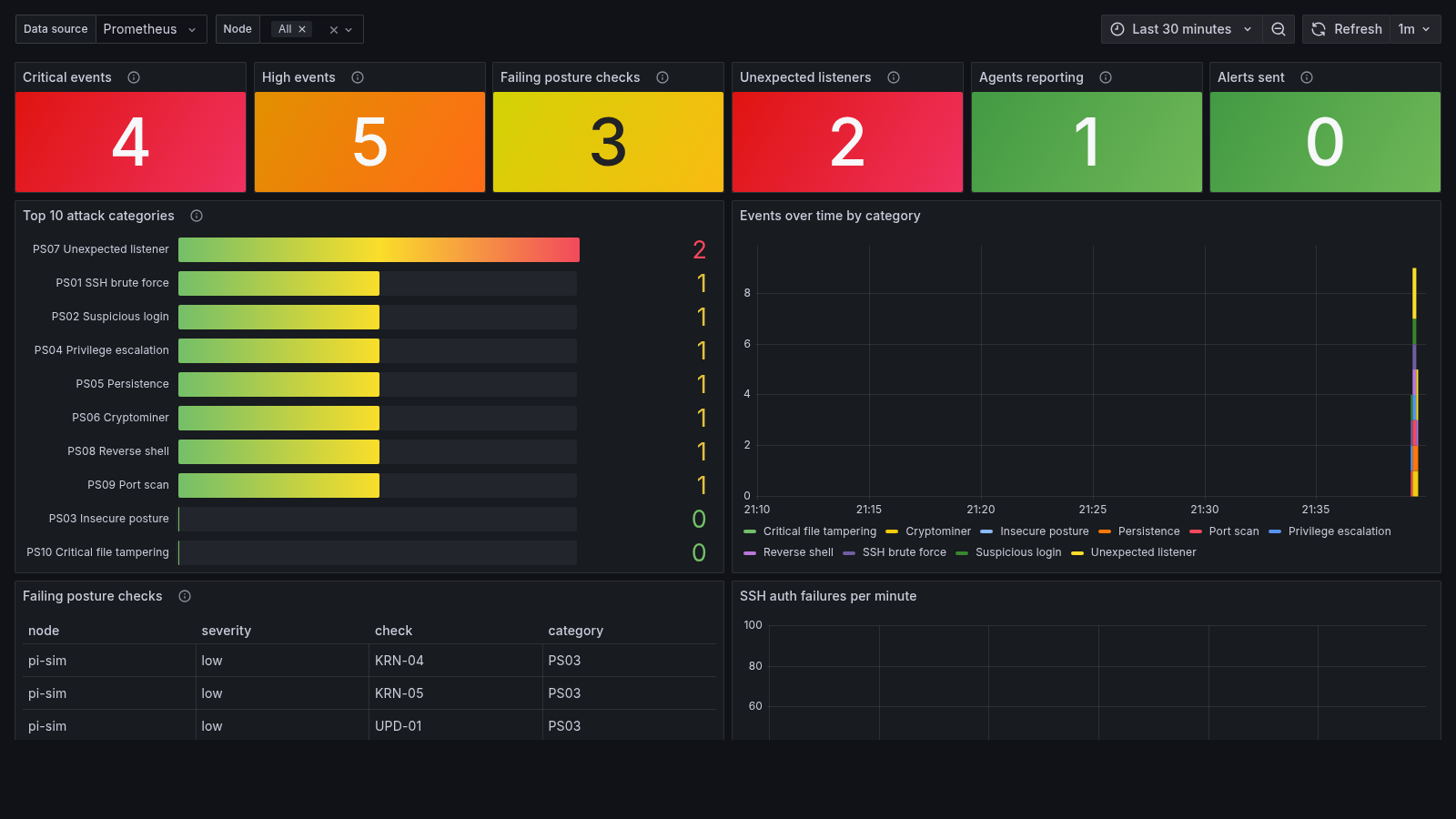
One object per line on stdout, so journald, kubectl logs and any log shipper can read it.
{"time":"2026-10-15T05:14:02Z","host":"kubepi","category":"PS08",
 "category_name":"Reverse shell","severity":"critical","mitre":["T1059.004"],
 "detector":"proc",
 "summary":"Reverse shell: bash (pid 5358) has fd 0 connected to 192.0.2.2:4445",
 "fields":{"pid":"5358","ppid":"1","comm":"bash","exe":"/usr/bin/bash",
           "remote":"192.0.2.2:4445","fd":"0","uid":"0"}}
Event counters start at zero, so increase() sees the first event. Alert on the agent going quiet, not just on attacks.
# TYPE pisentry_events_total counter
pisentry_events_total{category="PS08",name="Reverse shell",severity="critical"} 1
pisentry_events_total{category="PS01",name="SSH brute force",severity="high"} 1
pisentry_unexpected_listeners 2
pisentry_detector_last_run_timestamp_seconds{detector="proc"} 1.7605e+09
pisentry_up{host="kubepi"} 1

# alert rules worth having
increase(pisentry_events_total{severity="critical"}[5m]) > 0
absent(pisentry_up)
time() - pisentry_detector_last_run_timestamp_seconds{detector=~"proc|listeners|fim"} > 900
High and critical events go to ntfy, Discord, Slack or any webhook. The URL and token come from the environment, never from the config file.
# /etc/pisentry/config.json
"alerts": { "type": "ntfy", "min_severity": "high", "max_per_hour": 30 }

# /etc/pisentry/pisentry.env  (mode 0600)
PISENTRY_WEBHOOK_URL=https://ntfy.sh/a-long-random-topic-name

$ sudo systemctl restart pisentry && sudo pisentry test-alert
Built for the Pi
It runs on three Pi 4 nodes and one x86 box in a k3s cluster every day. The numbers below come from that cluster.
64-bit Raspberry Pi OS, Ubuntu or Debian. Also proven in CI on native arm64 runners.
Same code, cross-compiled. Hardware test reports are welcome.
Works with SELinux enforcing. One multi-arch image covers the whole cluster.
On the roadmap with ARM benchmarks.
Measured with kubectl top on 2026-10-16. The hard cap is 256 MiB under systemd and in the pod. The process stays small; the cap leaves room for kernel file cache, which counts against it.
CPU was 1 to 3 millicores per node. That is under one third of one percent of a core.
State is written only when it changed, at most every 30 seconds.
Writes are atomic and fsynced. A power cut leaves the old file or the new one.
Compared
Falco is great at the container runtime. pisentry covers the host underneath: auth abuse, posture, files and persistence.
| Falco | pisentry | |
|---|---|---|
| Signal | Syscalls via eBPF or a kernel module | Logs, /proc, file hashes |
| Best at | Container runtime behavior | SSH and auth abuse, posture, file integrity, host persistence |
| Stock Pi kernel | No BTF, so a kernel module must be built per node | Runs as is |
| Needs | Privileged pod, kernel driver | Three capabilities, no kernel features |
| Memory request | 128 Mi | 24 Mi |
| Sees a 1 ms process | Yes | No, it polls every 15 s |
Get started
No install and no daemon. The audit exits with code 2 if anything is high or critical, so it also works in scripts.
curl -fsSLO https://github.com/MrGuato/pisentry/releases/latest/download/pisentry-linux-arm64
curl -fsSLO https://github.com/MrGuato/pisentry/releases/latest/download/SHA256SUMS
sha256sum --check --ignore-missing SHA256SUMS
chmod +x pisentry-linux-arm64 && sudo ./pisentry-linux-arm64 audit
Use pisentry-linux-armv7 on 32-bit Pi OS and pisentry-linux-amd64 on x86.
FAIL    high      SSH-02  SSH root login permitted       PermitRootLogin yes
FAIL    medium    SSH-01  SSH password authentication enabled
How to fix:
  SSH-02: Set 'PermitRootLogin no' (or prohibit-password if you need key-based root).
git clone https://github.com/MrGuato/pisentry && cd pisentry
sudo ./deploy/install.sh
The binary goes to /usr/local/bin, config to /etc/pisentry and secrets to a 0600 env file. The unit keeps two capabilities, a syscall filter, a read-only system and a 256 MiB memory cap.
Copy deploy/kubernetes/ into your cluster repo. The DaemonSet pins the image by digest, because this agent is root-equivalent on every node.
kubectl -n pisentry get ds pisentry
kubectl -n pisentry exec ds/pisentry -- pisentry report
kubectl -n pisentry logs -l app.kubernetes.io/name=pisentry -f | jq 'select(.severity=="critical")'
Releases after v0.1.0 are signed by the release workflow with Sigstore cosign. You need cosign 3 or later.
cosign verify-blob \
  --bundle SHA256SUMS.sigstore.json \
  --certificate-identity-regexp '^https://github.com/MrGuato/pisentry/\.github/workflows/release\.yml@refs/tags/v' \
  --certificate-oidc-issuer https://token.actions.githubusercontent.com \
  SHA256SUMS
Trust
A host agent runs as root. So every step from commit to container is locked down, and you can check each one yourself.
main requires signed commits, a pull request and green checks. No force pushes, no bypass.
Releases after v0.1.0 sign the image and checksums keyless with cosign. The identity is the release workflow.
Every image ships SLSA provenance and an SBOM you can inspect with buildx.
Actions by commit SHA, base images by digest. Dependabot proposes, a human merges.
govulncheck, CodeQL, staticcheck and go vet. Tests run on x86 with the race detector and on native arm64.
OpenSSF Scorecard grades the repo's practices in public.
Read the security page for the threat model, pod grants and how to report a bug in private.
Roadmap
Rules you can load, real-time process events, attack chains and k3s checks. Live from GitHub milestones.
FAQ
No. Falco watches syscalls from the container runtime. pisentry watches the host: logs, files, processes and posture. Run both where you can. On a stock Pi kernel, pisentry may be the one that runs.
On a 2 GB Pi 4 in k3s it uses 16 MiB of memory and 2 millicores of CPU. It is capped at 256 MiB.
One known case where it did: v0.1.0 had a 96 MiB cap and re-ran its SUID walk on every start. On a control-plane Pi with a large /home, the kernel cache from that walk filled the cap, the agent restarted in a loop, and its reads competed with k3s on the SD card. v0.1.1 raised the cap and resumes slow scans after a restart instead.
It reads /etc/shadow, other users' /proc entries and the journal. The systemd unit keeps two capabilities and the pod keeps three. Everything else is taken away.
Root wins. An attacker with root can stop the agent or edit its state. Ship events off the box and alert when pisentry_up goes missing. That is the real defense.
Not today. pisentry detects and alerts. Automated response is on the roadmap, off by default and fenced by allowlists.
Thresholds, allowlists and extra watch paths are config today. A rule engine for your own patterns is the next milestone.
Nothing. It is MIT licensed, and it stays that way.
Download, verify, run. If the audit finds nothing, you sleep better. If it does, it tells you how to fix it.
curl -fsSLO https://github.com/MrGuato/pisentry/releases/latest/download/pisentry-linux-arm64
curl -fsSLO https://github.com/MrGuato/pisentry/releases/latest/download/SHA256SUMS
sha256sum --check --ignore-missing SHA256SUMS
chmod +x pisentry-linux-arm64 && sudo ./pisentry-linux-arm64 audit